

Table of Contents
Cloud infrastructure is messy. When an alert fires “EC2 instance unresponsive” or “High CPU utilization”, the initial triage often feels like an archaeological dig. Analysts have to leave their ticketing system, authenticate into the AWS console (cue the MFA prompts), hunt for the specific resource ID, and remember the correct CLI syntax to get the ground truth.
This context-switching tax is heavy. It extends Mean Time to Resolution (MTTR) and burns out analysts who spend more time gathering data than fixing problems.
This article explores a pre-built Tines workflow—Investigate AWS issues with CLI data using agents—that eliminates this manual data gathering by bringing the CLI directly to the case.
The problem: The “context gap” in incident response
In many organizations, there is a disconnect between where work is tracked (Jira, ServiceNow) and where the data lives (AWS, Azure, internal logs).
A “simple” investigation often involves:
- Access Friction: Logging into multiple consoles and assuming roles.
- Syntax Struggles: Wasting cycles figuring out the correct CLI syntax and flags to look up information, rather than simply retrieving the answer.
- Security Risks: Giving analysts broad read-access to production environments just to check a status.
Manual processes like these are the enemy of scale. As noted in a recent Tines case study, for a major crowdfunding platform, moving from manual spreadsheets to orchestration reduced unpatched vulnerabilities by 83% in just 90 days.
The lesson? “Focus on security work rather than the mundane tasks behind it.”
Learn how modern IT Ops teams use orchestration to manage capacity, improve reliability, and scale infrastructure without burnout.
This practical guide shows how to replace manual workflows with predictable, automated operations using the tools you already have.
Get the guide
The solution: automated CLI execution via agents
The Investigate AWS issues with CLI data workflow bridges the gap between your ticket and your cloud environment. It uses Tines agents—secure, lightweight runners that can send commands to AWS using secure credentials—to execute CLI commands safely within an intelligent workflow and return the results to the analyst.
Instead of the analyst going to the CLI, the CLI comes to the analyst.
Here is an overview of how the workflow operates:
1. The trigger – The workflow initiates when a new case or ticket is created regarding an AWS resource. This could be triggered automatically by a CloudWatch alarm or manually by an analyst noticing an anomaly.
2. The Agent intermediary – Tines doesn’t need direct, over-privileged access to your cloud. Instead, it instructs a Tines agent running with specified read-only access to AWS. This ensures your cloud credentials stay local and secure.
3. Dynamic command generation – The workflow doesn’t rely on rigid, pre-defined scripts. Instead, the “magic” lies in the agent’s ability to construct the necessary CLI command from scratch based on the context of the ticket. Whether you need to inspect an S3 bucket policy or check an EC2 instance’s security group, the agent intelligently forms the correct syntax and executes it, providing a level of flexibility that static automation can’t match.
4. AI formatting & enrichment – Raw CLI output (often dense JSON) is difficult for humans to parse quickly. The workflow uses Tines’ transformation capabilities (or an optional AI step) to parse this data into a clean, readable summary or table.
5. Case update – The formatted findings are appended directly to the Tines Case or your ITSM tool. The analyst opens the ticket and immediately sees the current state, security groups, and public IPs of the instance—no login required.
The benefits
Implementing this workflow drives efficiency across the entire incident lifecycle:
- Zero-touch context: Analysts start their investigation with the data already in front of them. There is no “gathering phase,” only a “solving phase.”
- Secure access: You don’t need to grant every junior analyst read access to the AWS console. The Tines agent handles the privilege, acting as a secure proxy for specific, approved commands.
- Standardized documentation: Every investigation has the exact same data snapshot attached. This creates a perfect audit trail, which Tines Cases captures automatically.
- Collaborative resolution: By pulling data into Tines Cases, teams can comment, tag, and collaborate in real-time on the “new or unknown,” preventing the siloed communication that happens when data is stuck in a terminal window.
How to build it
This workflow is available as a template to jumpstart your intelligent workflow journey.
Step 1: Import the story Visit the Tines Library and search for Investigate AWS issues with CLI data using agents. Click “Import” to add it to your tenant.
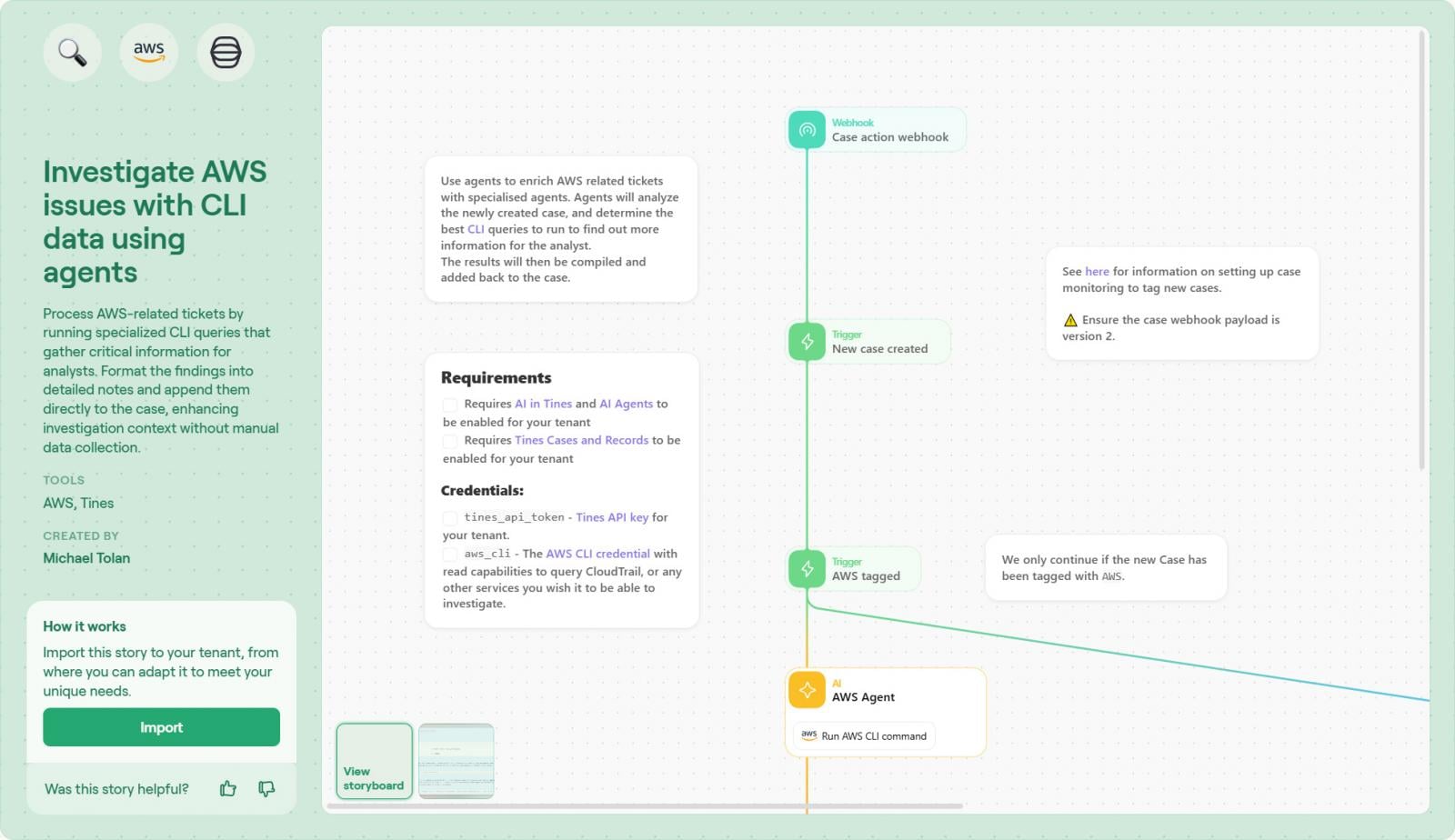
Step 2: Connect Your AWS Credential To allow the agent to interact with your environment, connect a secure AWS credential (like an IAM role or access key) directly within the Tines tenant. No complex infrastructure deployment or external runners are required.
Step 3: Modify Recommended Commands The template includes a list of example commands to help guide the agent, but these aren’t the only ones it can use. You can edit this list to steer the agent’s behavior, specifying commands you would like it to use more frequently based on your team’s most common tickets
Step 4: Review Case Format The workflow is already pre-wired to send findings to Tines Cases, so no manual connection is needed. However, you should review the Case layout to ensure it suits your analysts. You might want to adjust the order of fields or how the AI summary is presented to ensure the most critical data is visible at a glance.
Step 5: Test and define Run the workflow with a dummy ticket. Verify that the agent executes the command and that the output is formatted correctly in the Case view.
Conclusion
The difference between a stressed SOC and an efficient one is often the “mundane tasks.” When analysts have to manually fetch data for every alert, they drown in noise.
By orchestrating these routine checks with Tines and Tines agents, you flip the script. You give your team the context they need instantly, allowing them to focus on the high-value decision-making that actually protects the organization.
As the crowdfunding tech company discovered, intelligent workflows don’t just save time. When implemented properly, they fundamentally change the security posture.
For a deeper look at how Tines Cases can centralize your investigation data, check out this product spotlight: Tines Cases | Product Spotlight. This video demonstrates how the Cases interface consolidates data, making it the perfect destination for the automated AWS insights generated by this workflow.
Sponsored and written by Tines.