


Microsoft has fixed a known issue that prevented Microsoft 365 customers from opening encrypted emails in classic Outlook after a December update.
This bug affects users who try to open messages encrypted with “Encrypt Only” permissions, a policy that doesn’t restrict forwarding, printing, or copying the email.
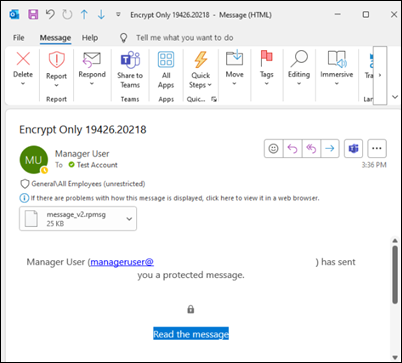
On impacted systems, users are seeing a message_v2.rpmsg attachment instead of readable content, which renders the encrypted message inaccessible.

“After updating to Current Channel Version 2511 (Build 19426.20218) recipients may not be able to open ‘Encrypt Only’ emails,” Microsoft said three weeks ago when it acknowledged the issue.
“In the Reading Pane you may get a message ‘This message with restricted permission cannot be viewed in the reading pane until you verify your credentials. Open the item to read its contents and verify your credentials’.”
In a Thursday update to the original support document, Microsoft says a fix is now available for customers in the Beta Channel and will roll out to customers in the Current Channel (Build 19725.20000) and Current Channel Preview (Build 19725.20000) in February.
Microsoft also provides two temporary workarounds for users who can’t immediately upgrade to a fixed version of Outlook. One of them requires senders to use the Encrypt option under the Options ribbon (as detailed in this support document) instead of the File dialog.
Alternatively, users have to revert to a software build that isn’t affected by this known issue by closing all Office apps and running the following command from an elevated command prompt
"%programfiles%\Common Files\Microsoft Shared\ClickToRun\officec2rclient.exe" /update user updatetoversion=16.0.19426.20186
Last year, Microsoft addressed multiple other issues affecting classic Outlook users, including bugs that broke email drag-and-drop functionality after installing Windows 24H2 updates and caused CPU spikes while typing messages.
Previously, the Outlook team fixed a bug that triggered classic Outlook crashes when opening emails or starting new messages and shared a temporary workaround for a known issue that caused Outlook errors when opening encrypted emails.
More recently, it patched a major bug that prevented Microsoft 365 users from opening classic Outlook on Windows and released emergency, out-of-band Windows updates to fix classic Outlook freezes.

Whether you’re cleaning up old keys or setting guardrails for AI-generated code, this guide helps your team build securely from the start.
Get the cheat sheet and take the guesswork out of secrets management.